Intro
Why design classes? We want an interface that is easy to use correctly and hard to use incorrectly. OOP gives us tools to remove user mistakes via API design, rather than by asking users nicely to follow conventions. We remove the potential for mistakes and enhance readability.
We will not be giving up on the other things we’ve emphasized before, like modularity. You can make bad designs with OOP, just like you can make bad designs with any paradigm. In fact, with OOP you can make some really bad spaghetti code if you really want to prove how smart you are[1] or want job security!
Let’s define some terminology we’ve been seeing, along with a bit of new stuff:
Encapsulation (meaning 1): The idea of bundling data & operations together under one roof.
Encapsulation (meaning 2): Isolating the implementation and only providing access to a minimal “public” part.
Object/instance: A variable holding data with a type holding functions.
Attribute: Something accessible on an object.
Member: A data attribute stored in each object.
Method/Member function: A callable attribute stored in a class and callable from an object
Constructor/Initializer: A function that creates instances of a class
Destructor: A function that runs when an instance is destroyed. Much more interesting in non-garbaged collected languages (C++); they tend to be rather useless when combined with a garbage collector, because you can’t guarantee when or if they will be called.
Inheritance: When one class uses another as a starting point, and just extends by adding or overrides existing methods.
Composition (meaning 1): Adding instances of classes as members of a new class.
Composition (meaning 2): Combining non-overlapping classes via multiple inheritance.
Interface: A collection of methods/members that need to be provided in order to be used.
Why should we use classes and objects?
Pass around and keep related values together.
Inheritance and Composition can be used to keep code DRY.
Clean way to establish interfaces (via Abstract Base Classes (ABCs) or Protocols (see static typing))
Ensure required code is run (constructors, destructors, context managers, etc)
Associate functions to a specific type (varies by language)
In languages without type based dispatch, classes are an ideal way to ensure functions are associated with the type they were intended to be called on. Even in languages with multiple dispatch, they still help with discoverability, such as tab completion in editors.
Why inheritance?
If you want two classes both to have a set of data or methods specified by the same code, you can put the code in class A and have class B “inherit” that code. We then say that A is the parent class or super class of B, and that B is the child class or subclass of A.
Provides the concept of “is a” (
isinstance/issubclassin Python).Provides a way to “realize” or “implement” a specified interface (ABC or Protocol).
For example, in content/week10_oop/geom_example/geometry/classic.py, Shape
is a base class with area() and perimeter() methods. It doesn’t know how to
compute those - they are abstract. This means you can’t instantiate Shape(),
doing so would give you an error (from the abc module). However, the
subclasses of Shape like Rectangle and Circle do know how to compute this,
so they can be instantiated.
When you require a Shape object, you can accept any concrete subclass of
Shape (no abstract methods left). Again, when we get to static typing, we’ll
learn how to formalize this requirement, for now, we have to trust duck typing
and willpower to avoid using anything that’s not in Shape when we accept it as
an argument.
Why composition/aggregation?
Provides the concept of “has a”, or “inherent part of”.
Kidneyis a part ofHuman, for example.Composition is generally when the contained object’s lifetime is tied to the parent object (one can’t exist without the other). Aggregation is more “has a” or “is in a”; like Ducks in a Pond. The Pond can dry up and the Ducks persist, and the Ducks can move between Ponds.
You can use composition as a replacement for inheritance in some cases. For example, in our geometry example, we could have made Square inherit from Shape instead, and hold a Rectangle as an attribute, and then use that Rectangle to compute the methods of the Square. The benefit is that we now control the interface Square provides completely; adding something to Rectangle does not add it to Square unless we also wrap it there. For this case, it’s not a great design, but imagine if Rectangle was from somewhere we didn’t control (and if square was not as conceptually a variation of a rectangle is it really is!).
An important contributor to designing good classes is this: A child class cannot remove attributes from a parent. It can override them or add new ones, but not remove. Be very careful if you are exposing more public API than you want to!
UML diagrams
UML, or Unified Modeling Language, is a method of displaying class diagrams (read more here), or read about it for mermaid, which is supported quite a lot of places these days, including GitHub. Let’s see what our simple Geom example looks like:
All the supported relationships are:
SOLID
Single responsibility.
Classes should aim to do one thing (modular) - can do more, but be careful!
Minimize number of reasons to alter a class/function/module, etc.
Open-closed principle.
Design your interfaces well, everything should conform to that.
API should be stable (closed) but extensible (open).
Liskov substitution principle.
You should be able to substitute a child class anywhere a parent class is expected.
You should not remove arguments from an overloaded function, for example.
Interfaces should be specific and segregated.
You shouldn’t depend on methods you don’t use.
Protocols will really help with this - we’ll get there in static typing!
You can add an interface class layer to limit access.
Dependency inversion (depend on abstractions, not concretions)
High level code should not depend on low level code details (implementations)
Low level code should depend on high level abstractions.
Interfaces example:
Let’s say Xerox makes a multifunction machine, with Stapler and Printer objects of class Job. Job holds everything for interacting with the machine - printing, copying, stapling, etc. This quickly will become a maintenance nightmare - what if Printer starts accessing Stapler functions (accidentally or on purpose)? What if Xerox decides to make a copier that can’t staple? There’s too much interdependency; this also makes testing much harder.
Design principles
Provide minimal public API
You should try to limit the Public API as much as possible. Everything you add
as public API means something someone might depend on and something you can’t
easily refactor. Attributes or methods that are implementation details (not part
of the public API) should be hidden or have restricted access. Some languages
provide ways to forcibly lock down access; Python only provides convention with
an _ at the start of names, but that’s fine - use it with your methods and
don’t use _ methods of other classes.
In some languages, you should avoid/limit direct access to members, as this could limit you from ever adding an operation that occurs when setting or getting that value. This is not an issue with Python, since the following class:
class Container:
    def __init__(self, x):
        self.x = x

c = Container(1)
print(f"{c.x = }")
c.x = 2
print(f"{c.x = }")
c.x = 1
c.x = 2
Can be refactored and still provide the same user API:
class Container:
    def __init__(self, x):
        self._x = x

    @property
    def x(self):
        print("Accessing x")
        return self._x

    @x.setter
    def x(self, value):
        print("Setting x")
        self._x = value

c = Container(1)
print(f"{c.x = }")
c.x = 2
print(f"{c.x = }")
Accessing x
c.x = 1
Setting x
Accessing x
c.x = 2
Object Oriented Programming design patterns
The following is a collection of design patterns for OOP.
Code reuse
This is not the most common use, but is a really simple one, so let’s start with it.
If we have some code that has many steps:
class SteppedCode:
    def step_1(self):
        print("Working on step 1")
    def step_2(self):
        print("Working on step 2")
    def step_3(self):
        print("Working on step 3")
    def run(self):
        self.step_1()
        self.step_2()
        self.step_3()

SteppedCode().run()
Working on step 1
Working on step 2
Working on step 3
You can then use inheritance to swap out arbitrary steps:
class NewSteps(SteppedCode):
    def step_2(self):
        print("Replaced step 2")

NewSteps().run()
Working on step 1
Replaced step 2
Working on step 3
We can also inject code around a step:
class SurroundedSteps(SteppedCode):
    def step_2(self):
        print("Before step 2")
        super().step_2()
        print("After step 2")

SurroundedSteps().run()
Working on step 1
Before step 2
Working on step 2
After step 2
Working on step 3
Real code likely will pass values around or use class attributes, but the idea remains. That leads into the next, more common pattern.
Required interface
This allows you to request a user specify an interface to use your code. For example:
integrator_example/integrator/__init__.py
import numpy as np
import abc


__all__ = ["EulerIntegrator", "RK4Integrator"]


def __dir__():
    return __all__


class IntegratorBase(abc.ABC):
    @abc.abstractmethod
    def compute_step(self, f, t_n, y_n, h):
        pass

    def integrate(self, f, t, init_y):
        steps = len(t)
        order = len(init_y)  # Number of equations

        y = np.empty((steps, order))
        y[0] = init_y  # Note that this sets the elements of the first row

        for n in range(steps - 1):
            h = t[n + 1] - t[n]
            y[n + 1] = self.compute_step(f, t[n], y[n], h)

        return y
To implement an integrator, we have to provide compute_step:
class EulerIntegrator(IntegratorBase):
    def compute_step(self, f, t_n, y_n, h):
        # Compute dydt based on *current* position
        dydt = f(t_n, y_n)

        # Return next velocity and position
        return y_n - dydt * h
We can implement more:
class RK4Integrator(IntegratorBase):
    def compute_step(self, f, t_n, y_n, h):
        # Compute k1 through k4
        k1 = h * f(t_n, y_n)
        k2 = h * f(t_n + h / 2, y_n + k1 / 2)
        k3 = h * f(t_n + h / 2, y_n + k2 / 2)
        k4 = h * f(t_n + h, y_n + k3)

        # Return next velocity and position
        return y_n + 1 / 6 * (k1 + 2 * k2 + 2 * k3 + k4)
The UML diagram is:
Now we can use it:
import matplotlib.pyplot as plt
import numpy as np

from integrator import EulerIntegrator, RK4Integrator


def f(t, y):
    "Y has two elements, x and v"
    return np.array([-1 * y[1], y[0]])

ts = np.linspace(0, 40, 1000 + 1)
euler = EulerIntegrator()
y_euler = euler.integrate(f, ts, [1, 0])
rk4 = RK4Integrator()
y_rk4 = rk4.integrate(f, ts, [1, 0])

fig, ax = plt.subplots()
ax.plot(ts, y_euler[:, 0], "--", label="Euler")
ax.plot(ts, y_rk4[:, 0], ":", lw=5, label="RK4")
ax.plot(ts, np.cos(ts), label="Analytical")
ax.legend()
plt.show()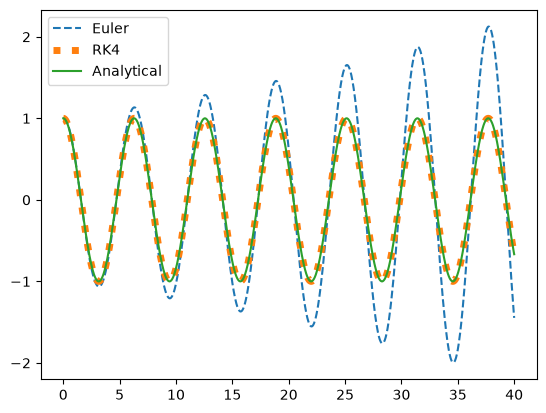
Functors
Functors are things that you can call, but hold some state as well. A classic functor would be a counter. You can use classes to create Functors. Without classes, you’d have to write something horrifying like this:
_start = 0


def incr():
    global _start
    _start += 1
    return _start

print(f"{incr() = }")
print(f"{incr() = }")
print(f"{incr() = }")
incr() = 1
incr() = 2
incr() = 3
This has to use a global, and there can only be one of them; if you wanted two counters, this design wouldn’t work. You could use capture and generate a new function:
def make_incr():
    _start = 0
    def incr():
        nonlocal _start
        _start += 1
        return _start
    return incr

incr1 = make_incr()
incr2 = make_incr()
print(f"{incr1() = }")
print(f"{incr1() = }")
print(f"{incr2() = }")
print(f"{incr2() = }")
incr1() = 1
incr1() = 2
incr2() = 1
incr2() = 2
And in fact, when lambda functions (which include capture semantics) were added to C++, the need for custom functors really decreased. However, the class version of a counter is easier to read:
import dataclasses


@dataclasses.dataclass
class Incr:
    start: int = 0

    def __call__(self):
        self.start += 1
        return self.start


incr = Incr()
incr()
class Incr:
def __init__(self, start=0):
self.start = start
def __call__(self):
self.start += 1
return self.start
incr = Incr()
incr()This is explicit, clear, multiple instances can be created without having them interfere, I can see exactly what’s going on without having to trace down a global, and you can even set the default value when you make a new instance!
Separation of concerns
Classes allow you to organize code so that each each class addresses a specific concern.
Some languages (Ruby, Rust) support partial classes, which can load portions based on what you are interested in doing, but Python and C++ do not. Type dispatch (C++, Julia) can be used as an alternative. Python has mixins, covered below, which are not quite the same as partial classes, but provide similar benefits. Ruby has both partial classes and mixins but not multiple inheritance.
eDSLs
You can use classes to make embedded Domain Specific Languages (eDSLs). You can build a custom mini-language on top of the Python syntax.
For example, let’s say I want to make path-like objects that I can join with
/:
class Path(str):
    def __truediv__(self, other):
        return self.__class__(f"{self}/{other}")


print(Path("one") / Path("two"))
one/two
Just in case you want to make a Path class like the one above - don’t, use
pathlib.Path instead.
Mixins
Multiple inheritance can be tricky to use, but a common, useful pattern is a limited form of multiple inheritance called mixins. With mixins, you provide a few reusable features, and then compose the classes from one or more mixins, with an optional superclass. Let’s rewrite the Path example using mixins:
class PathMixin:
    def __truediv__(self, other):
        return self.__class__(f"{self}/{other}")


class Path(str, PathMixin):
    pass


print(Path("one") / Path("two"))
Notice we now built the mixin without subclassing anything - we could mix it into any class we want later. We could mix in multiple classes if we wanted. It’s quite powerful. Just remember a few rules for simple mixins:
Mixins shouldn’t have
__init__'s.Mixins shouldn’t add members (since that should only be done in
__init__)Mixins shouldn’t have
super()calls or overload something in the base class.Once we get to static typing, mixins should always have a Protocol to define what interface the class they mix into needs to have.
You can bend these rules a bit, but then you are moving into multiple inheritance territory, so be very careful.
When I’ve try this I usually manage to prove just the opposite a month later...