CUDA is NVIDIA’s platform for parallel programming on Graphics Processing Units (GPUs). It exposes the massive parallelism of the GPU to scientific computing, with the goal of delivering high performance for scientific applications.
CUDA C/C++ and CUDA Fortran are based on the industry-standard C/C++ and Fortran languages, with:
a small set of extensions to enable heterogeneous programming
straightforward APIs to manage devices, memory, etc.
In this lecture, we will:
start from “Hello World!”
write and launch CUDA C/C++ kernels
manage GPU memory
manage communication and synchronization
Graphics Processing Units (GPU)
GPU model
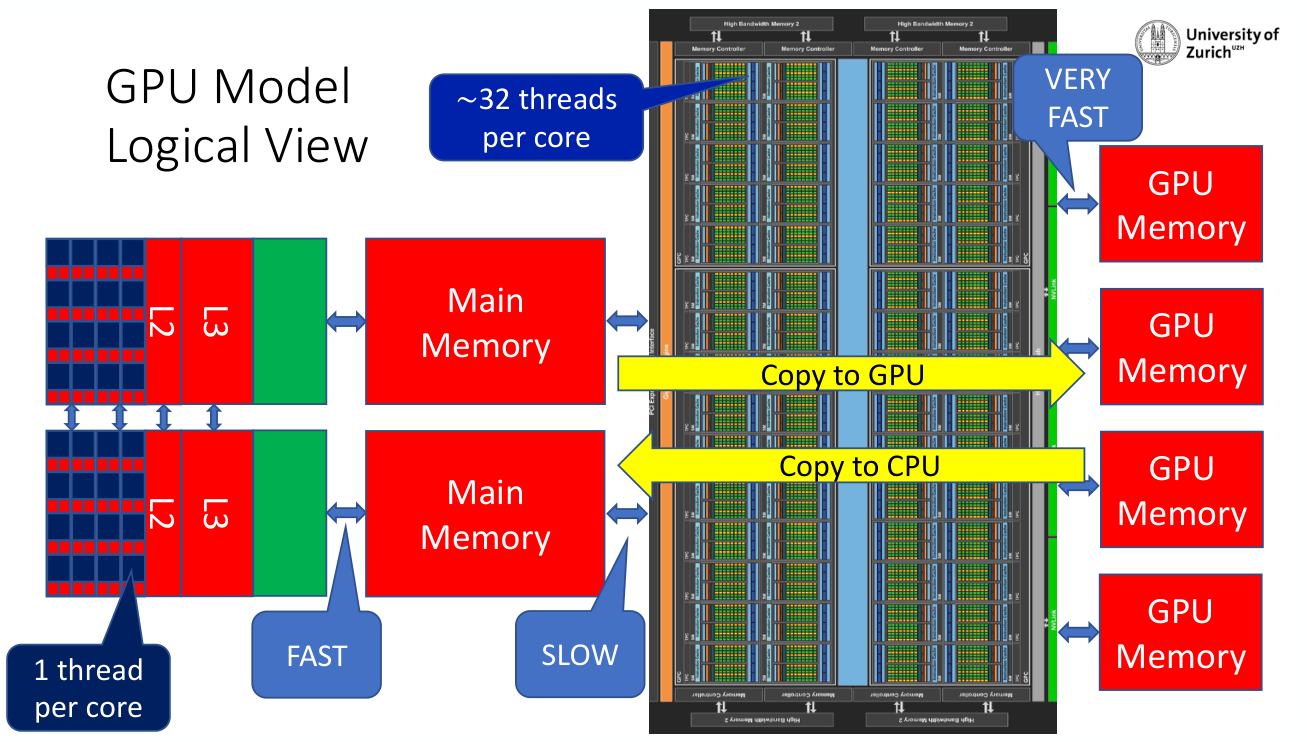
A CPU core runs 1 thread at a time, with fast access to its main memory. A GPU runs about 32 threads per core, with very fast access to its own memory. But data has to be copied from the CPU main memory to the GPU memory and back, which is slow.
GPU programming
CUDA: NVIDIA GPUs are usually programmed using the vendor proprietary language CUDA. It is interfaced with C and C++ to create GPU kernels.
Warning: CUDA requires a complete rewrite of the computing intensive sections of the code, and lacks portability. Extracting maximum performance is difficult.
OpenACC: similar to OpenMP, it uses directives to load data on and retrieve data from the GPU, and to translate C and Fortran code into GPU kernels.
Better portability, but it usually also requires a rewrite of the routines.
Available in the NVIDIA HPC SDK (formerly the PGI compiler suite) and in GCC.
OpenMP: since version 4.5, OpenMP allows offloading of parallel sections to the GPU using the
targetdirective.Implemented in the GNU, Intel, LLVM, and NVIDIA compilers.
New generation of compilers and frameworks: the goal is to hide the dirty details from the programmer. Legion is an example of a compiler and runtime system. Kokkos is an example of a framework.
Heterogeneous computing
Terminology
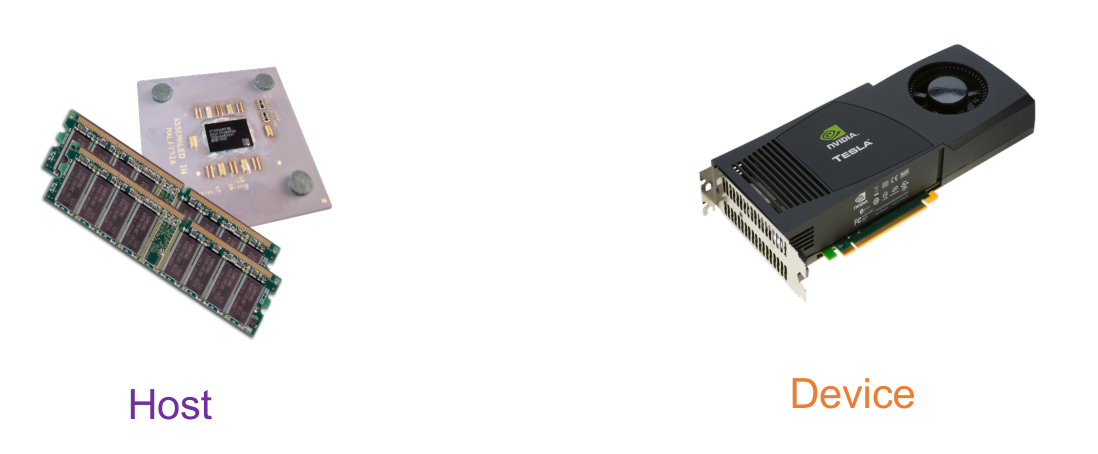
Host: the CPU and its memory (host memory).
Device: the GPU and its memory (device memory).
A CUDA program mixes serial code, which runs on the host, and parallel code, which runs on the device. The parallel functions executed on the device are called kernels. Here is a complete example, which we will build up step by step in this lecture:
#include <cuda.h>
#include <stdio.h>
#include <stdlib.h>

#define N 100000
#define M 256

// parallel function
__global__ void add(int *a, int *b, int *c) {
  int index = threadIdx.x + blockIdx.x * blockDim.x;
  if (index < N)
    c[index] = a[index] + b[index];
}

void random_ints(int *x, int size) {
  int i;
  for (i = 0; i < size; i++) x[i] = rand() % 10;
}

int main(void) {
  int *a, *b, *c;        // host copies of a, b, c
  int *a_d, *b_d, *c_d;  // device copies of a, b, c
  int size = N * sizeof(int);

  // Alloc space for device copies of a, b, c
  cudaMalloc((void **)&a_d, size);
  cudaMalloc((void **)&b_d, size);
  cudaMalloc((void **)&c_d, size);

  // Alloc space for host copies of a, b, c and setup input values
  a = (int *)malloc(size); random_ints(a, N);
  b = (int *)malloc(size); random_ints(b, N);
  c = (int *)malloc(size);

  // Copy inputs to device
  cudaMemcpy(a_d, a, size, cudaMemcpyHostToDevice);
  cudaMemcpy(b_d, b, size, cudaMemcpyHostToDevice);

  // Launch add() kernel on GPU (parallel code)
  add<<<(N + M - 1) / M, M>>>(a_d, b_d, c_d);

  // Copy result back to host
  cudaMemcpy(c, c_d, size, cudaMemcpyDeviceToHost);

  // Cleanup
  free(a); free(b); free(c);
  cudaFree(a_d); cudaFree(b_d); cudaFree(c_d);
  return 0;
}
Simple processing flow
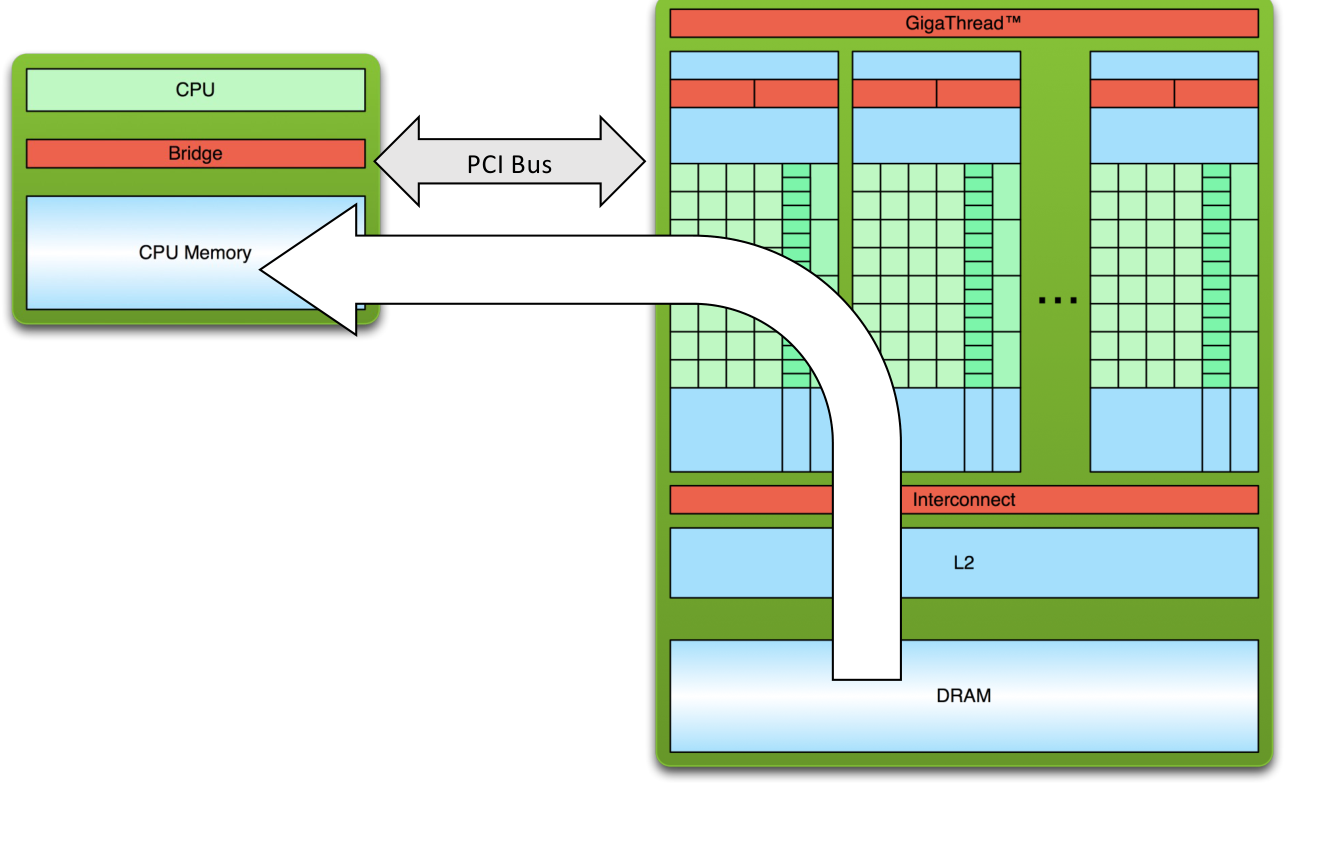
The CPU and the GPU are connected through the PCI bus. A typical GPU computation proceeds in three steps:
Copy input data from CPU memory to GPU memory.
Load the GPU program and execute it, caching data on chip for performance.
Copy results from GPU memory back to CPU memory.
Transfers over the PCI bus are slow compared to the GPU memory bandwidth, so a good GPU code minimizes the data movement between host and device.
Hello World!
Host code only
#include <stdio.h>

int main(void) {
  printf("Hello World!\n");
  return 0;
}
$ nvcc hello_world.cu
$ ./a.out
Hello World!This is standard C (or Fortran) that runs on the host. The NVIDIA compilers
(nvcc or nvfortran) can also be used to compile programs with no device
code.
Hello World! with device code
#include <stdio.h>

__global__ void mykernel(void) {}

int main(void) {
  mykernel<<<1, 1>>>();
  printf("Hello World!\n");
  return 0;
}
There are two new syntactic elements here. First, the __global__ keyword
indicates a function, called a kernel, that:
runs on the device
is called from the host
nvcc separates the source code into host and device components:
device functions (e.g.
mykernel()) are processed by the NVIDIA compilerhost functions (e.g.
main()) are processed by the standard host compiler, for examplegcc
Second, the call mykernel<<<1,1>>>():
Triple angle brackets mark a call from host code to device code. This is also called a kernel launch.
The arguments inside the brackets correspond to
<<<blocks, threads_per_block>>>. We will return to this terminology later.
That’s all that is required to execute a function on the GPU!
$ nvcc hello.cu
$ ./a.out
Hello World!
So far, mykernel() does nothing. Let’s write a parallel code.
Parallel programming in CUDA
GPU computing is about massive parallelism. We will start by adding two integers and build up to adding two vectors .
Addition on the device
A simple kernel to add two integers:
__global__ void add(int *a, int *b, int *c) {
  *c = *a + *b;
}
As before, __global__ is a CUDA keyword meaning that:
add()will be executed on the deviceadd()will be called from the host
Note that we use pointers for the variables. Because add() runs on the device,
a, b and c must point to device memory. In other words, we need to
allocate memory on the GPU.
Memory management
Host and device memory are separate entities:
Device pointers point to GPU memory. They may be passed to and from host code, but may not be dereferenced in host code.
Host pointers point to CPU memory. They may be passed to and from device code, but may not be dereferenced in device code.
CUDA provides a simple API for handling device memory: cudaMalloc(),
cudaFree() and cudaMemcpy(). They are similar to their C equivalents
malloc(), free() and memcpy().
Addition on the device: main()
int main(void) {
  int a, b, c;           // host copies of a, b, c
  int *a_d, *b_d, *c_d;  // device copies of a, b, c
  int size = sizeof(int);

  // Allocate space for device copies of a, b, c
  cudaMalloc((void **)&a_d, size);
  cudaMalloc((void **)&b_d, size);
  cudaMalloc((void **)&c_d, size);

  // Setup input values
  a = 2;
  b = 7;

  // Copy inputs to device
  cudaMemcpy(a_d, &a, size, cudaMemcpyHostToDevice);
  cudaMemcpy(b_d, &b, size, cudaMemcpyHostToDevice);

  // Launch add() kernel on GPU
  add<<<1, 1>>>(a_d, b_d, c_d);

  // Copy result back to host
  cudaMemcpy(&c, c_d, size, cudaMemcpyDeviceToHost);

  // Print the result
  printf("c = %d\n", c);

  // Cleanup
  cudaFree(a_d); cudaFree(b_d); cudaFree(c_d);
  return 0;
}
We use the suffix _d to identify pointers to device memory. This naming
convention is not required by CUDA, but it helps avoid dereferencing a device
pointer in host code by mistake.
Moving to parallel
Parallel blocks
So how do we run code in parallel on the device? Instead of executing add()
once:
add<<<1, 1>>>();we execute it N times in parallel:
add<<<N, 1>>>();With add() running in parallel, we can do vector addition:
Terminology: each parallel invocation of
add()is referred to as a block.The set of blocks is referred to as a grid.
Each invocation can refer to its block index using
blockIdx.x.
__global__ void add(int *a, int *b, int *c) {
  c[blockIdx.x] = a[blockIdx.x] + b[blockIdx.x];
}
By using blockIdx.x to index into the array, each block handles a different
index. On the device, each block can be executed in parallel:
| Block 0 | Block 1 | Block 2 | Block 3 |
|---|---|---|---|
c[0] = a[0]+b[0]; | c[1] = a[1]+b[1]; | c[2] = a[2]+b[2]; | c[3] = a[3]+b[3]; |
Vector addition on the device: main()
#define N 512

int main(void) {
  int *a, *b, *c;        // host copies of a, b, c
  int *a_d, *b_d, *c_d;  // device copies of a, b, c
  int size = N * sizeof(int);

  // Alloc space for device copies of a, b, c
  cudaMalloc((void **)&a_d, size);
  cudaMalloc((void **)&b_d, size);
  cudaMalloc((void **)&c_d, size);

  // Alloc space for host copies of a, b, c and setup input values
  a = (int *)malloc(size); random_ints(a, N);
  b = (int *)malloc(size); random_ints(b, N);
  c = (int *)malloc(size);

  // Copy inputs to device
  cudaMemcpy(a_d, a, size, cudaMemcpyHostToDevice);
  cudaMemcpy(b_d, b, size, cudaMemcpyHostToDevice);

  // Launch add() kernel on GPU with N blocks
  add<<<N, 1>>>(a_d, b_d, c_d);

  // Copy result back to host
  cudaMemcpy(c, c_d, size, cudaMemcpyDeviceToHost);

  // Cleanup
  free(a); free(b); free(c);
  cudaFree(a_d); cudaFree(b_d); cudaFree(c_d);
  return 0;
}Recapitulation
Difference between host and device:
Host: CPU
Device: GPU
Using
__global__to declare a function as device code:executes on the device
is called from the host
Passing parameters from host code to a device function.
Basic device memory management:
cudaMalloc()cudaMemcpy()cudaFree()
Launching parallel kernels:
launch
Ncopies ofadd()withadd<<<N,1>>>(...);use
blockIdx.xto access the block index
CUDA threads
Terminology: a block can be split into parallel threads. Let’s change
add() to use parallel threads instead of parallel blocks. We use threadIdx.x
instead of blockIdx.x:
__global__ void add(int *a, int *b, int *c) {
  c[threadIdx.x] = a[threadIdx.x] + b[threadIdx.x];
}
We need to make only one change in main(), the kernel launch:
// Launch add() kernel on GPU with N threads
add<<<1, N>>>(a_d, b_d, c_d);
The rest of main() is identical to the previous version.
Combining blocks and threads
We have seen parallel vector addition using:
many blocks with one thread each:
add<<<N,1>>>one block with many threads:
add<<<1,N>>>
Let’s adapt vector addition to use the full parallel power of the device by incorporating both blocks and threads. We start with data indexing.
Indexing
A kernel is launched as a grid of blocks of threads.
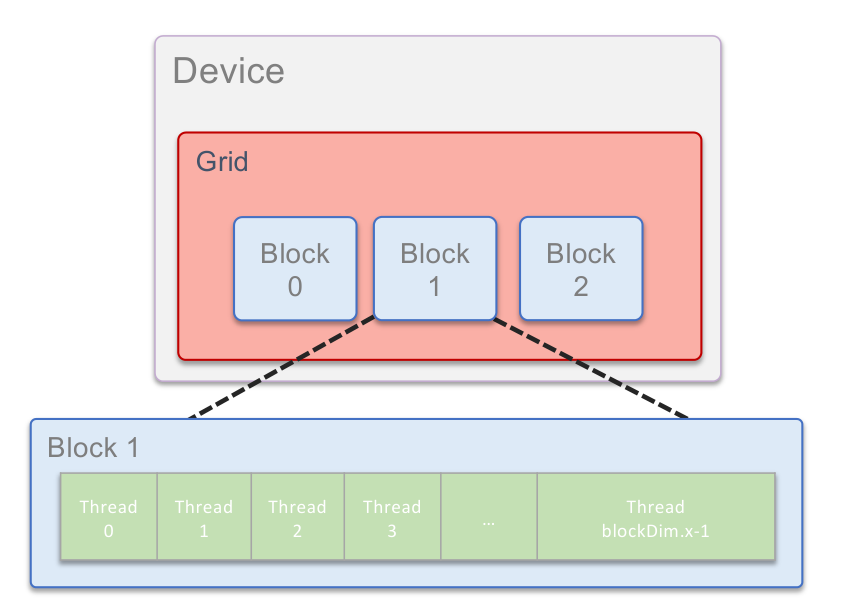
CUDA provides the following built-in variables:
| Variable | Meaning |
|---|---|
threadIdx.x | Thread index inside the block |
blockIdx.x | Block index |
blockDim.x | Number of threads per block |
gridDim.x | Number of blocks in the grid |
Indexing arrays
Indexing is no longer as simple as using blockIdx.x or threadIdx.x. Consider
indexing an array with one element per thread, with 8 threads per block:

With 8 threads per block, a unique index for each thread is given by:
int index = threadIdx.x + blockIdx.x * 8;Which thread will operate on the red element below?
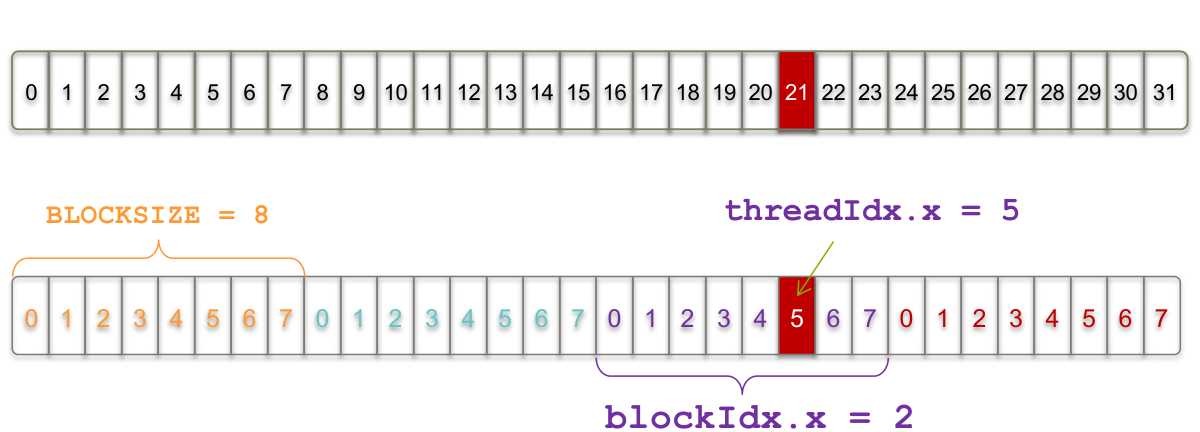
int index = threadIdx.x + blockIdx.x * BLOCKSIZE;
//        =      5      +     2      * 8;
//        = 21;
Vector addition with blocks and threads
Instead of hard-coding the block size, we use the built-in variable blockDim.x
for the number of threads per block:
int index = threadIdx.x + blockIdx.x * blockDim.x;The combined version of add() uses parallel threads and parallel blocks:
__global__ void add(int *a, int *b, int *c) {
  int index = threadIdx.x + blockIdx.x * blockDim.x;
  c[index] = a[index] + b[index];
}
What changes need to be made in main()?
#define N (2048 * 2048)
#define BLOCKSIZE 512

int main(void) {
  int *a, *b, *c;        // host copies of a, b, c
  int *a_d, *b_d, *c_d;  // device copies of a, b, c
  int size = N * sizeof(int);

  // Alloc space for device copies of a, b, c
  cudaMalloc((void **)&a_d, size);
  cudaMalloc((void **)&b_d, size);
  cudaMalloc((void **)&c_d, size);

  // Alloc space for host copies of a, b, c and setup input values
  a = (int *)malloc(size); random_ints(a, N);
  b = (int *)malloc(size); random_ints(b, N);
  c = (int *)malloc(size);

  // Copy inputs to device
  cudaMemcpy(a_d, a, size, cudaMemcpyHostToDevice);
  cudaMemcpy(b_d, b, size, cudaMemcpyHostToDevice);

  // Launch add() kernel on GPU
  add<<<N / BLOCKSIZE, BLOCKSIZE>>>(a_d, b_d, c_d);

  // Copy result back to host
  cudaMemcpy(c, c_d, size, cudaMemcpyDeviceToHost);

  // Cleanup
  free(a); free(b); free(c);
  cudaFree(a_d); cudaFree(b_d); cudaFree(c_d);
  return 0;
}
Handling arbitrary vector sizes
Typical problems are not friendly multiples of blockDim.x. We need to avoid
accessing beyond the end of the arrays:
__global__ void add(int *a, int *b, int *c, int n) {
  int index = threadIdx.x + blockIdx.x * blockDim.x;
  if (index < n)
    c[index] = a[index] + b[index];
}
and update the kernel launch to round the number of blocks up:
add<<<(N + BLOCKSIZE - 1) / BLOCKSIZE, BLOCKSIZE>>>(a_d, b_d, c_d, N);Why bother with threads and blocks?
Using both threads and blocks seems unnecessarily complicated: they add a level of complexity. What do we gain?
Unlike parallel blocks, threads have mechanisms to:
communicate
synchronize
To understand why, we need to look at the hardware.
GPU architecture
Pascal P100
As an example, we consider the NVIDIA Pascal P100, a GPU designed for High Performance Computing. The chip is organized into many Streaming Multiprocessors (SMs), connected to a shared L2 cache and to the high-bandwidth device memory:
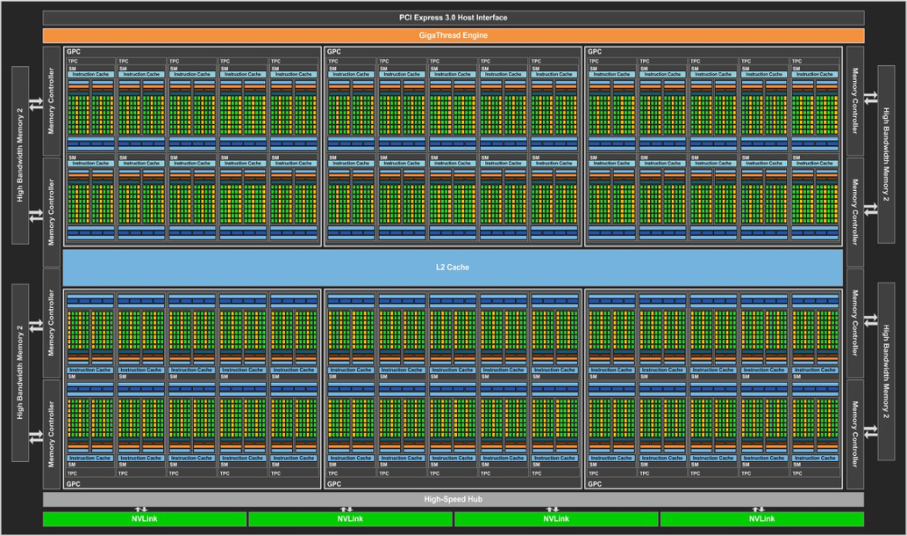
Streaming Multiprocessor (SM)
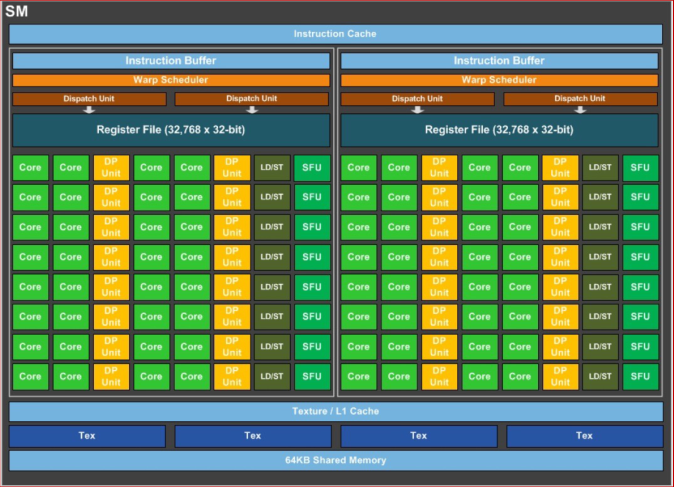
Each SM contains many cores, organized in groups of 32 called warps. The software hierarchy maps onto this hardware hierarchy:
an SM is made of warps, each warp of 32 cores
a block is made of warps, each warp of 32 threads
Terminology
| Concept | Description |
|---|---|
| Thread | Each thread is executed by one core. |
| Warp | A warp consists of 32 cores that share the register memory and operate simultaneously by construction. |
| Block | Each block is assigned to one SM and consists of warps. The threads of a block share the SM’s 64 KB on-chip memory. |
| Grid | The kernel is executed over a grid of blocks. |
This explains why threads within a block can communicate and synchronize: they run on the same SM and share its fast on-chip memory. Blocks, on the other hand, may run on different SMs, in any order.
Recapitulation
What have we learned?
Write and launch CUDA kernels:
__global__,<<<blocks, threads_per_block>>>threadIdx.x,blockIdx.x,blockDim.x
Manage GPU memory:
cudaMalloc(),cudaMemcpy(),cudaFree()
Extra topics
Coordinating host and device
Kernel launches are asynchronous: control returns to the host immediately. The host needs to synchronize before consuming the results.
| Function | Behavior |
|---|---|
cudaMemcpy() | Blocks the host until the copy is complete. The copy begins when all preceding kernel calls have completed. |
cudaMemcpyAsync() | Asynchronous, does not block the host. |
cudaDeviceSynchronize() | Blocks the host until all preceding kernel calls have completed. |
Reporting errors
All CUDA API calls return an error code (cudaError_t). This error can come
from:
the API call itself, or
an earlier asynchronous operation (e.g. a kernel).
Get the error code for the last error:
cudaError_t cudaGetLastError(void);Get a string to describe the error:
char *cudaGetErrorString(cudaError_t);For example:
printf("%s\n", cudaGetErrorString(cudaGetLastError()));3D indexing
A kernel is launched as a grid of blocks of threads, and blockIdx and
threadIdx are in fact 3D. So far, we showed only one dimension (x).
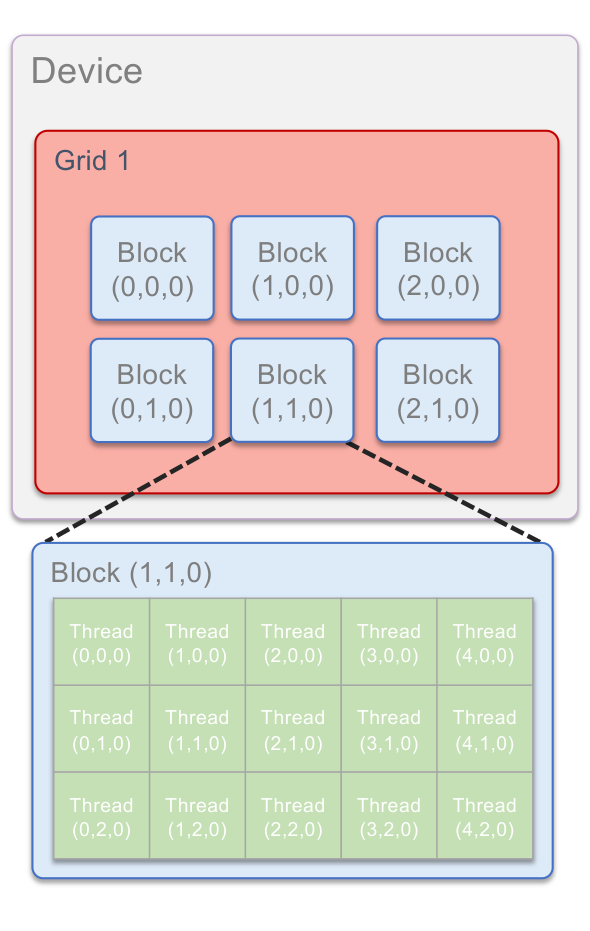
The built-in variables are:
| Variable | Meaning |
|---|---|
threadIdx | Thread indices (x, y, z) |
blockIdx | Block indices (x, y, z) |
blockDim | Number of threads per block (x, y, z) |
gridDim | Number of blocks (x, y, z) |
Sharing data between threads
Terminology: within a block, threads share data via shared memory:
extremely fast on-chip memory, managed by the user
declared using
__shared__, allocated per blockdata is not visible to threads in other blocks
Thread synchronization
void __syncthreads();Synchronizes all threads within a block. It is used to prevent race condition hazards.
All threads must reach the barrier. In conditional code, the condition must be uniform across the block.
For example, the following kernel computes the sum of the elements handled by each block. Each thread first copies one element into shared memory, then the threads cooperate to reduce the shared array, with a barrier between each step:
#define BLOCKSIZE 512

__global__ void block_sum(int *in, int *out, int n) {
  __shared__ int temp[BLOCKSIZE];
  int index = threadIdx.x + blockIdx.x * blockDim.x;

  // Copy one element per thread into shared memory
  temp[threadIdx.x] = (index < n) ? in[index] : 0;
  __syncthreads();

  // Tree reduction within the block
  for (int stride = blockDim.x / 2; stride > 0; stride /= 2) {
    if (threadIdx.x < stride)
      temp[threadIdx.x] += temp[threadIdx.x + stride];
    __syncthreads();
  }

  // Thread 0 writes the partial sum of this block
  if (threadIdx.x == 0)
    out[blockIdx.x] = temp[0];
}
Note that __syncthreads() is called outside the if statements, so that every
thread of the block reaches the barrier.
Device management
An application can query and select GPUs:
cudaGetDeviceCount(int *count);
cudaSetDevice(int device);
cudaGetDevice(int *device);
cudaGetDeviceProperties(cudaDeviceProp *prop, int device);
Multiple host threads can share a device.
A single host thread can manage multiple devices, using
cudaSetDevice(i)to select the current device.
Examples
We now revisit the two examples of the OpenMP and MPI lectures, this time using
CUDA. They can be found in the codes/ directory. They were run on an NVIDIA
A100 GPU (PCIe version with 40 GB of memory), a GPU designed for High
Performance Computing, with 108 SMs and 32 double precision cores per SM, that
is 3456 double precision cores in total.
Computing 
We compute using the integral
approximated with the midpoint rule using points. We launch a
fixed number of blocks, and each thread loops over the points index,
index + stride, index + 2*stride, ..., where stride is the total number of
threads. This is called a grid-stride loop. Each thread computes its own
partial sum. The threads of each block then combine their partial sums in
shared memory using the same tree reduction as in the block_sum example above.
Finally, thread 0 of each block adds the result of its block to the total using
atomicAdd(), which guarantees that two blocks cannot update the total at the
same time:
// Based on Tim Mattson's code for
// https://github.com/tgmattso/OpenMP_intro_tutorial
#include <cuda.h>
#include <stdio.h>
#include <sys/time.h>

#define NBLOCKS 1024
#define BLOCKSIZE 256

// parallel function: each thread computes a partial sum over many steps,
// then the threads of each block combine their partial sums
__global__ void compute_sum(long long num_steps, double step, double *sum) {
  __shared__ double temp[BLOCKSIZE];
  long long index = threadIdx.x + (long long)blockIdx.x * blockDim.x;
  long long stride = (long long)blockDim.x * gridDim.x;

  // Each thread handles the steps index, index+stride, index+2*stride, ...
  double partial = 0;
  for (long long i = index; i < num_steps; i += stride) {
    double x = (i + 0.5) * step;
    partial += 4.0 / (1.0 + x * x);
  }

  // Copy one partial sum per thread into shared memory
  temp[threadIdx.x] = partial;
  __syncthreads();

  // Tree reduction within the block
  for (int s = blockDim.x / 2; s > 0; s /= 2) {
    if (threadIdx.x < s)
      temp[threadIdx.x] += temp[threadIdx.x + s];
    __syncthreads();
  }

  // Thread 0 adds the partial sum of this block to the total
  if (threadIdx.x == 0)
    atomicAdd(sum, temp[0]);
}

// wall-clock time in seconds
double wtime(void) {
  struct timeval tv;
  gettimeofday(&tv, NULL);
  return tv.tv_sec + 1e-6 * tv.tv_usec;
}

int main(void) {
  long long num_steps = 10000000000LL;
  double step = 1.0 / num_steps;
  double sum;     // host copy of sum
  double *sum_d;  // device copy of sum
  double t0, t1;
  int k;

  // Alloc space for device copy of sum
  cudaMalloc((void **)&sum_d, sizeof(double));

  printf("Starting with %d blocks of %d threads\n", NBLOCKS, BLOCKSIZE);

  for (k = 0; k < 4; k++) {
    // Set the device copy of sum to zero
    cudaMemset(sum_d, 0, sizeof(double));

    t0 = wtime();
    // Launch compute_sum() kernel on GPU
    compute_sum<<<NBLOCKS, BLOCKSIZE>>>(num_steps, step, sum_d);
    // Kernel launches are asynchronous: wait for the GPU to finish
    cudaDeviceSynchronize();
    t1 = wtime();

    // Copy result back to host
    cudaMemcpy(&sum, sum_d, sizeof(double), cudaMemcpyDeviceToHost);
    printf("pass %d time (ms): %f %.15f\n", k + 1, 1000 * (t1 - t0),
           step * sum);
  }

  // Check for errors (from the API calls or from the kernels)
  printf("%s\n", cudaGetErrorString(cudaGetLastError()));

  // Cleanup
  cudaFree(sum_d);
  return 0;
}
atomicAdd() for double precision numbers requires a GPU of compute capability
6.0 or higher, so we need to tell nvcc which GPU we compile for. For the A100,
this is compute capability 8.0:
$ nvcc -O3 -arch=sm_80 compute_pi_cuda.cu -o compute_pi_cuda
$ ./compute_pi_cuda
Starting with 1024 blocks of 256 threads
pass 1 time (ms): 29.883862 3.141592653589794
pass 2 time (ms): 29.698133 3.141592653589794
pass 3 time (ms): 29.675961 3.141592653589794
pass 4 time (ms): 29.706001 3.141592653589794
no error
As for the CPU codes, we repeat the computation 4 times and report the time of the last pass:
| Version | Time (s) | Speedup |
|---|---|---|
| 1 CPU core | 12.86 | 1 |
| OpenMP (8 threads) | 1.82 | 7 |
| MPI (8 tasks) | 1.76 | 7 |
| CUDA (1 A100 GPU) | 0.030 | 430 |
The CPU timings are those of the OpenMP and MPI lectures on the Apple M1 Max. This example is compute bound: it performs only computations on variables that stay in the registers. It therefore fully benefits from the thousands of cores of the GPU, which is about 60 times faster than the 8 CPU cores.
The power function
We now parallelize the loop computing the polynomial
for elements. Each thread computes one
element of y. The input array x is copied to the GPU only once, then the
kernel is launched 4 times, and the result y is copied back to the CPU at the
end. We also time the two copies:
#include <cuda.h>
#include <stdio.h>
#include <stdlib.h>
#include <sys/time.h>

#define N 100000000
#define BLOCKSIZE 256

// parallel function: each thread computes one element of y
__global__ void power(double *x, double *y, int n) {
  int index = threadIdx.x + blockIdx.x * blockDim.x;
  if (index < n) {
    double xi = x[index];
    y[index] = xi * (1 + xi * (1 + xi * (1 + xi * (1 + xi * (1 + xi * (1 + xi * (1 + xi)))))));
  }
}

// wall-clock time in seconds
double wtime(void) {
  struct timeval tv;
  gettimeofday(&tv, NULL);
  return tv.tv_sec + 1e-6 * tv.tv_usec;
}

int main(void) {
  double *x, *y;      // host copies of x, y
  double *x_d, *y_d;  // device copies of x, y
  size_t size = (size_t)N * sizeof(double);
  double t0, t1;
  int i, k;

  // Alloc space for device copies of x, y
  cudaMalloc((void **)&x_d, size);
  cudaMalloc((void **)&y_d, size);

  // Alloc space for host copies of x, y and setup input values
  x = (double *)malloc(size);
  y = (double *)malloc(size);
  for (i = 0; i < N; i++) x[i] = rand() / (double)RAND_MAX;

  // Copy input to device (only once: transfers over the PCI bus are slow)
  t0 = wtime();
  cudaMemcpy(x_d, x, size, cudaMemcpyHostToDevice);
  t1 = wtime();
  printf("Starting with %d blocks of %d threads\n",
         (N + BLOCKSIZE - 1) / BLOCKSIZE, BLOCKSIZE);
  printf("copy x to device time (ms): %f\n", 1000 * (t1 - t0));

  for (k = 0; k < 4; k++) {
    t0 = wtime();
    // Launch power() kernel on GPU
    power<<<(N + BLOCKSIZE - 1) / BLOCKSIZE, BLOCKSIZE>>>(x_d, y_d, N);
    // Kernel launches are asynchronous: wait for the GPU to finish
    cudaDeviceSynchronize();
    t1 = wtime();
    // Copy one element of the result back to host for printing
    cudaMemcpy(&y[k], &y_d[k], sizeof(double), cudaMemcpyDeviceToHost);
    printf("pass %d time (ms): %f %f\n", k + 1, 1000 * (t1 - t0), y[k]);
  }

  // Check for errors (from the API calls or from the kernels)
  printf("%s\n", cudaGetErrorString(cudaGetLastError()));

  // Copy the full result back to host
  t0 = wtime();
  cudaMemcpy(y, y_d, size, cudaMemcpyDeviceToHost);
  t1 = wtime();
  printf("copy y to host time (ms): %f\n", 1000 * (t1 - t0));

  // Cleanup
  free(x); free(y);
  cudaFree(x_d); cudaFree(y_d);
  return 0;
}
$ nvcc -O3 -arch=sm_80 power_cuda.cu -o power_cuda
$ ./power_cuda
Starting with 390625 blocks of 256 threads
copy x to device time (ms): 40.080070
pass 1 time (ms): 1.658916 3.951842
pass 2 time (ms): 1.163960 0.650827
pass 3 time (ms): 1.163960 3.099792
pass 4 time (ms): 1.164913 3.307003
no error
copy y to host time (ms): 94.070911
As for the CPU codes, the first pass is slower, and we report the time of the last pass:
| Version | Time (ms) | Speedup |
|---|---|---|
| 1 CPU core | 37.1 | 1 |
| OpenMP (8 threads) | 11.7 | 3.2 |
| MPI (8 tasks) | 11.9 | 3.1 |
| CUDA (1 A100 GPU) | 1.16 | 32 |
This example is memory bandwidth bound. On the CPU, we saw that the speedup saturates when the cores reach the maximum memory bandwidth of about 200 GB/s. The GPU memory has a much higher bandwidth, about 1.5 TB/s for our A100. For each element, the kernel reads 8 bytes and writes 8 bytes, so the GPU moves bytes in 1.16 ms, which is about 1.4 TB/s, close to the maximum bandwidth. The speedup compared to the 8 CPU cores, about 10, is therefore close to the ratio of the memory bandwidths, and is much smaller than for the example.
But this is not the whole story. Copying x to the GPU and y back to the CPU
over the PCI bus takes about 135 ms, more than 100 times the time of the kernel
itself, and even 3.5 times more than the time of the serial CPU code! The GPU
only pays off if the data stays in the GPU memory long enough, so that many
kernels can be executed between the copies. This is why porting an application
to the GPU often means moving most of the code to the GPU, not only the most
expensive loops.