Profiling is the process of measuring where your code spends time and resources. For scientific applications that may run for days or weeks on large supercomputers, even small performance improvements in critical bottlenecks can lead to massive time and energy savings.
In this lecture, we will:
discuss when (and when not) to optimize a code
understand how modern processors and memory work, and why it matters for performance
learn simple rules to help the compiler generate fast code
learn how to use a profiler to find the hot spots of a code
The original slides (by Jim Stone and Romain Teyssier) are available here.
Performance
The two principles of optimization
First principle of optimization: don’t
you sacrifice clarity
you sacrifice maintainability
Second principle of optimization: but you must
the problems you can solve are determined by the performance of your code
access to shared resources (clusters) often requires demonstrating good performance
Measuring performance
The quantum of time on a computer is a clock period (or cycle), which is the inverse of the frequency at which the processor runs.
The processor frequency is variable on most CPUs (e.g. turbo-boost), which complicates performance measurements.
Generally, performance 1/time. The goal is to minimize the time spent in each step of the computation (calculations, I/O, communication, etc.).
Performance can be measured using
profiling tools like
gprofand VTunea benchmark: a real-world application or kernel run on the hardware being tested. For example, the Linpack benchmark is used for the Top500 list.
We’re spoiled by Moore’s Law
In 1965, Gordon Moore predicted that the transistor density in integrated circuits would double every two years. In practice, performance has doubled roughly every 18 months, as shown by the Top500 list of the fastest computers in the world:
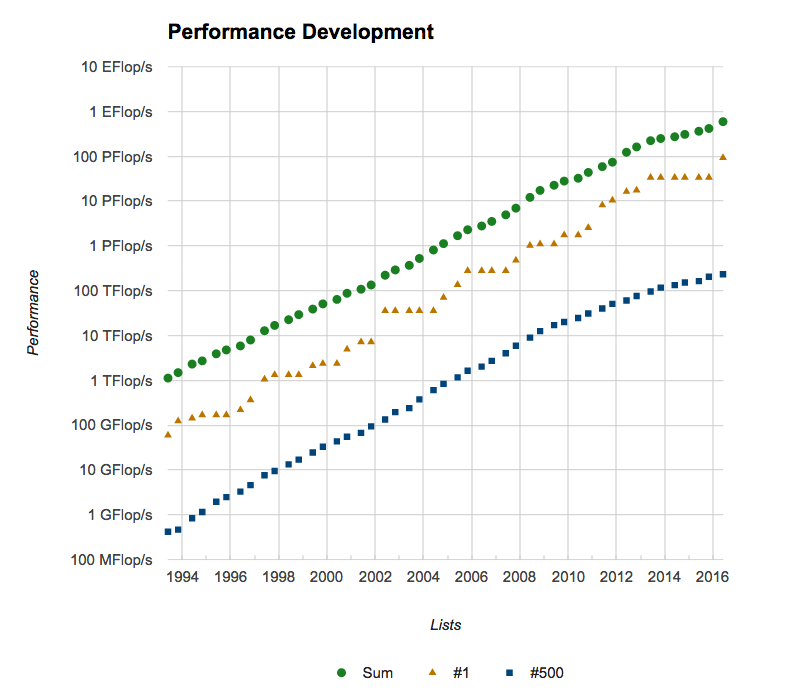
But we are forced to use mass-produced commodity processors that were not designed for scientific computing. To use them efficiently, we need to understand how they work.
Processor design
CPU, sockets, cores and threads
The CPU reads in, decodes, and executes machine instructions, working on memory and peripherals. On Linux, use
lscpuorcat /proc/cpuinfoto get the CPU architecture details.A core is an independent processing unit on a single chip.
A socket is the interface between the CPU and the motherboard. A node with 2 sockets and 16 cores per socket has 32 physical cores. Work on the node is called MIMD (Multiple Instructions Multiple Data).
A thread is the basic ordered sequence of instructions processed by a single core. A core with two hardware threads can execute instructions from two software threads without the overhead of switching between them.
The number of logical cores is “Thread(s) per core” × “Core(s) per socket” × “Socket(s)”. You can check it with
nproc --all.
Register-to-register architecture
Virtually all processors use a register-to-register architecture: data
processed by the CPU enters and leaves via registers. The statement C = A + B
becomes
Load  R1, A
Load  R2, B
Add   R3, R1, R2
Store R3, C
Each operation requires at least one clock period, so this example takes at least four clock periods.
Pipelining
The same sequence of instructions is often repeated many times (e.g. inside loops). Processors are designed so that different steps of the sequence can execute at the same time, like an assembly line:
| Clock cycle | 1 | 2 | 3 | 4 | 5 | 6 | 7 | 8 | 9 |
|---|---|---|---|---|---|---|---|---|---|
| instr. i | IF | ID | ME | EX | WB | ||||
| instr. i+1 | IF | ID | ME | EX | WB | ||||
| instr. i+2 | IF | ID | ME | EX | WB | ||||
| instr. i+3 | IF | ID | ME | EX | WB | ||||
| instr. i+4 | IF | ID | ME | EX | WB |
IF = instruction fetch, ID = instruction decode, ME = memory reference, EX = execute, WB = write back.
The pipeline takes 9 clock cycles to complete 5 instructions, instead of 5 × 5 = 25 cycles for an un-pipelined processor.
Once the pipeline is full, a result is produced every clock cycle.
This is an example of instruction level parallelism (ILP).
Vectorization (SIMD)
Vectorization is an example of data parallelism: identical instructions are performed on multiple data simultaneously (SIMD = Single Instruction Multiple Data).
Successive generations of Intel instruction sets (SSE, AVX2, AVX-512) have doubled the width of the vector registers. With AVX-512, a register holds 512 bits, i.e. 16 single precision or 8 double precision numbers, all processed in one instruction.
A surprisingly common complaint: “My code runs fast on large problems, but is 3-4x slower on small problems.” Most likely, vectorization is inefficient because the loop limits are smaller than the vector length.
Memory design
Reading data from RAM is slow
Most memory today is Dynamic Random Access Memory (DRAM), with a typical access time of 100 ns, i.e. hundreds of clock cycles.
Memory capacity and bandwidth grow more slowly than processor performance, leading to a growing memory/processor performance mismatch.
Good performance requires maximizing the number of floating point operations per memory access.
Hierarchical memory: the cache
To hide this latency, processors use small and fast memories close to the cores, called caches:
L1 cache: the smallest (tens of KB) and fastest, accessed in a single clock cycle.
L2 cache: larger (up to several MB), accessed in a few clock cycles.
L3 cache: even larger, slower than L1 and L2, but still faster than the main memory. Each core has its own L1 and L2, but all cores share the L3.
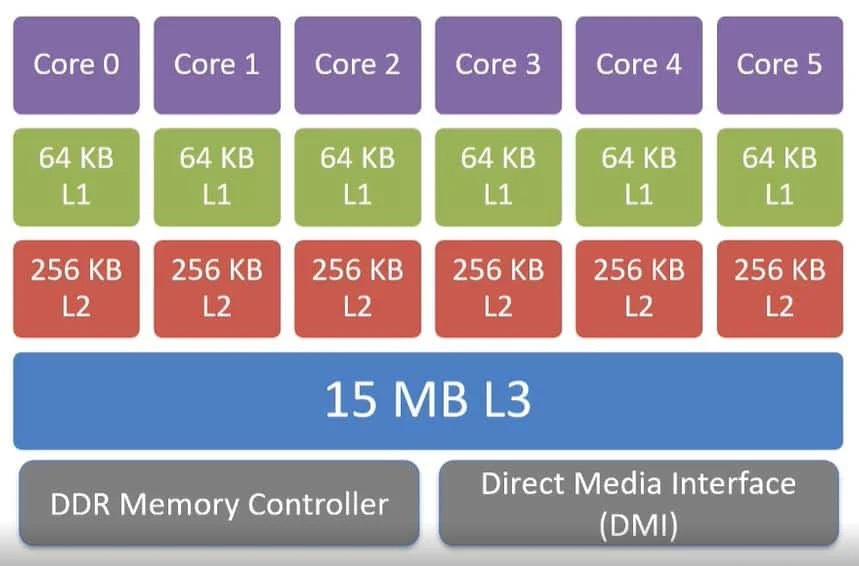
Example of cache memory architecture for a 6-core socket.
Cache lines, hits and misses
Most programs access adjacent memory locations sequentially (principle of locality).
Data is transferred between levels in blocks called cache lines. When item at address
Ais loaded, the entire cache line containingA,A+1,A+2, etc. is moved. If the processor needsA+1on the next cycle, it is already in cache.A cache hit (miss) occurs if the data is (is not) in cache when needed. A cache miss triggers a slow load from main memory.
The effective access time is
where is the hit rate. With ns, ns and , we get ns: almost as fast as cache!
Goal of the programmer: write code that maximizes the hit rate.
Another common complaint: “My code runs fine on a small problem, but when I
try a bigger problem, it slows to a crawl.” Most likely, the data structures no
longer fit in cache (much slower) or in main memory (much, much slower). The
following benchmark of y += alpha * x shows the drop in performance when the
vectors no longer fit in cache:
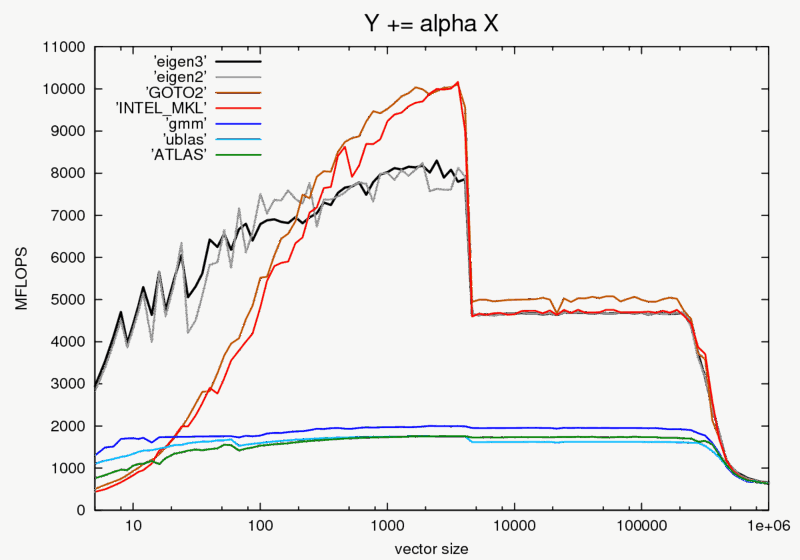
Source: Eigen benchmark.
Write code to maximize cache hits
Always access data contiguously: order the loops so that the inner loop runs over neighboring elements in memory (stride of one).
In C and C++, arrays are stored in row-major order (m[0][0], m[0][1],
m[0][2], ...), so the last index should vary fastest:
// row.c
#include <stdio.h>
#include <time.h>
int m[9999][9999];

int main() {
  clock_t start, stop;

  start = clock();
  for (int i = 0; i < 9999; i++)
    for (int j = 0; j < 9999; j++)
      m[i][j] = m[i][j] + (m[i][j] * m[i][j]);
  stop = clock();
  printf("The run-time of row major order is %lf\n",
         (double)(stop - start) / CLOCKS_PER_SEC);

  start = clock();
  for (int j = 0; j < 9999; j++)
    for (int i = 0; i < 9999; i++)
      m[i][j] = m[i][j] + (m[i][j] * m[i][j]);
  stop = clock();
  printf("The run-time of column major order is %lf\n",
         (double)(stop - start) / CLOCKS_PER_SEC);
  return 0;
}
$ gcc -Og -o row row.c
$ ./row
The run-time of row major order is 0.257015
The run-time of column major order is 0.690201Fortran uses exactly the opposite convention: arrays are stored in
column-major order (m(1,1), m(2,1), m(3,1), ...), so the first index
should vary fastest:
! column.f90
program column
  integer :: i, j
  real :: tstart, tstop
  integer, dimension(1:9999, 1:9999) :: m

  call cpu_time(tstart)
  do i = 1, 9999
     do j = 1, 9999
        m(i,j) = m(i,j) + m(i,j)*m(i,j)
     end do
  end do
  call cpu_time(tstop)
  write(*,*) 'The run-time of row major order is', tstop - tstart

  call cpu_time(tstart)
  do j = 1, 9999
     do i = 1, 9999
        m(i,j) = m(i,j) + m(i,j)*m(i,j)
     end do
  end do
  call cpu_time(tstop)
  write(*,*) 'The run-time of column major order is', tstop - tstart
end program column
$ gfortran -Og column.f90 -o col
$ ./col
The run-time of row major order is 0.916261017
The run-time of column major order is 0.148454964The same applies in Python: NumPy arrays are row-major by default (like C).
Also:
Use pointers carefully and sparingly: if a variable can be referenced in multiple ways (aliasing), the compiler cannot keep it in a register.
Avoid indirect addressing like
a[i[j]].
Role of compilers
Hardware is designed to optimize the instructions produced by compilers. Compilers can:
inline procedures into the calling code
eliminate common sub-expressions and unnecessary temporary variables
change the order of instructions (e.g. move code outside a loop)
pipeline and vectorize loops automatically
optimize register allocation
In short, compilers can do a lot, so let the compiler do the work.
Compiler options
For the GNU compilers (man gcc or man gfortran):
| Option | Description |
|---|---|
-O0 | no optimization, useful for debugging |
-O1 | conservative optimization, does not increase code size |
-O2 | normal optimization, vectorization and loop optimization |
-O3 | aggressive optimization, takes longer to compile and risky |
-fopenmp | activate OpenMP parallelization |
-g | add extra information for debuggers |
gfortran -O3 -fopenmp -x f95-cpp-input -DNDIM=2 code.f90 -o codeExamples of compiler optimizations
Inlining: replace a function call by its content in the calling routine.
Loop unrolling: reduce the loop overhead and expose more parallelism.
! before
do i = 1, n
   a(i) = b(i) + d*c(i)
end do

! after
do i = 1, n-3, 4
   a(i)   = b(i)   + d*c(i)
   a(i+1) = b(i+1) + d*c(i+1)
   a(i+2) = b(i+2) + d*c(i+2)
   a(i+3) = b(i+3) + d*c(i+3)
end do
do j = i, n
   a(j) = b(j) + d*c(j)
end doDivisions: replace slow divisions by multiplications.
! before
do i = 1, n
   do j = 1, m
      a(i,j) = d(j)/2
   end do
end do

! after
tempdiv = 1/2.
do i = 1, n
   do j = 1, m
      a(i,j) = d(j)*tempdiv
   end do
end do
Loop tiling: work on blocks of size
Bthat fit in cache.
// before
for (i = 0; i < n; i++)
  for (j = 0; j < n; j++)
    a[i][j] += b[i][j];

// after
for (ii = 0; ii < n; ii += B)
  for (jj = 0; jj < n; jj += B)
    for (i = ii; i < ii + B; i++)
      for (j = jj; j < jj + B; j++)
        a[i][j] += b[i][j];
Local versus global variables: local variables allow better cache management.
Algorithms and data structures
Most of the speed-up in scientific computing comes from algorithms, not from faster computers: iterative versus direct solvers, multigrid, conjugate gradient, FFT, tree codes, fast multipole methods...
The importance of scaling is illustrated by this example from Programming Pearls (Column 8), with 4 different algorithms for the same problem:
| Problem size n | ||||
|---|---|---|---|---|
| 103 | 1.3 secs | 10 msecs | 0.4 msecs | 0.05 msec |
| 104 | 22 mins | 1 sec | 6 msecs | 0.5 msecs |
| 105 | 15 days | 1.7 min | 78 msecs | 5 msecs |
| 106 | 41 yrs | 2.8 hrs | 0.94 secs | 48 msecs |
| 107 | 41 millennia | 1.7 wks | 11 secs | 0.48 secs |
Use back-of-the-envelope calculations to estimate the time and memory required for your task. Do you need a better algorithm or data structure?
Choose the best data structure (arrays, linked lists, hash tables, trees, heaps) at the start: it is very hard to change later.
Profiling
What is a profile?
A profile measures where a program spends its time:
frequency counts of routines
total time spent in each routine (and its children)
The term profile was invented by Donald Knuth in 1971.
When to worry about performance?
“Programmers waste enormous amounts of time thinking about, or worrying about, the speed of noncritical parts of their programs, and these attempts at efficiency have a strong negative impact when debugging and maintenance are considered. We should forget about small efficiencies, say about 97% of the time: premature optimization is the root of all evil. Yet we should not pass up our opportunities in that critical 3%. [...] It is often a mistake to make a priori judgments about what parts of a program are really critical, since the universal experience of programmers who have been using measurement tools has been that their intuitive guesses fail.”
Donald Knuth, 1974
Concentrate on the hot spots
Say your program takes 100 seconds and spends 90% of its time in one routine.
If you cut the run time of that routine by a factor of 3, the code now takes 40 seconds (60% less time).
If instead you cut the run time of the whole rest of the program by a factor of 3, the code now takes 97 seconds (3% less time).
Profiling with gprof
The traditional Unix tools are
profandgprof. They require compiling and linking with a special option (-pg).They use PC sampling: every so often, the system interrupts your program and records which instruction it is executing (the Program Counter).
Modern processors also contain hardware counters recording what the processor is doing (cache misses, vector instructions, etc.), accessible with more advanced tools.
$ g++ -pg imageAccess.cpp -o imageAccess
$ ./imageAccess 400
$ gprof imageAccess
For a 400×400 image (1000 calls of each routine):
  %   cumulative   self              self     total
 time   seconds   seconds    calls  us/call  us/call  name
 34.47      0.22     0.22     1000   220.63   220.63  add1(Image&, int)
 26.64      0.39     0.17     1000   170.49   170.49  add2(Image&, int)
 17.24      0.50     0.11     1000   110.32   110.32  add3(Image&, int)
 12.54      0.58     0.08     1000    80.23    80.23  set(Image&, int)
  9.40      0.64     0.06     1000    60.17    60.17  Image::Image(int, int)
For a 4000×4000 image (only 10 calls of each routine):
  %   cumulative   self              self     total
 time   seconds   seconds    calls  ms/call  ms/call  name
 52.31      1.21     1.21       10   121.35   121.35  add1(Image&, int)
 17.72      1.62     0.41       10    41.12    41.12  Image::Image(int, int)
 10.37      1.87     0.24       10    24.07    24.07  add2(Image&, int)
  9.94      2.10     0.23       10    23.07    23.07  set(Image&, int)
  9.94      2.33     0.23       10    23.07    23.07  add3(Image&, int)
add1 is only a little slower than add2 on the small image, but becomes 5
times slower on the large one. Why? (Hint: think about the cache!)
Advanced profilers
Linaro MAP (formerly Allinea MAP, part of Linaro Forge): C, C++, Fortran, lightweight GUI, source code profiling of compute, I/O, memory and MPI bottlenecks.
Intel VTune: extraordinarily powerful (and complicated), nice GUI, shared memory only (serial, OpenMP, MPI on a single node).
Intel Trace Analyzer and Collector: creates a timeline for every process, good for MPI scaling and bottlenecks, but can have a large overhead and create big files.
See the Princeton Research Computing knowledge base to get started.
Lessons learned
Don’t optimize prematurely, and don’t sacrifice clarity for the sake of efficiency, especially early on.
Choose efficient algorithms and data structures from the beginning: these can make a big difference.
Whenever possible, iterate over arrays in their natural order.
Let the compiler do the work.
If efficiency is important, profile the code once it’s working to find the hot spots (the critical 3%).